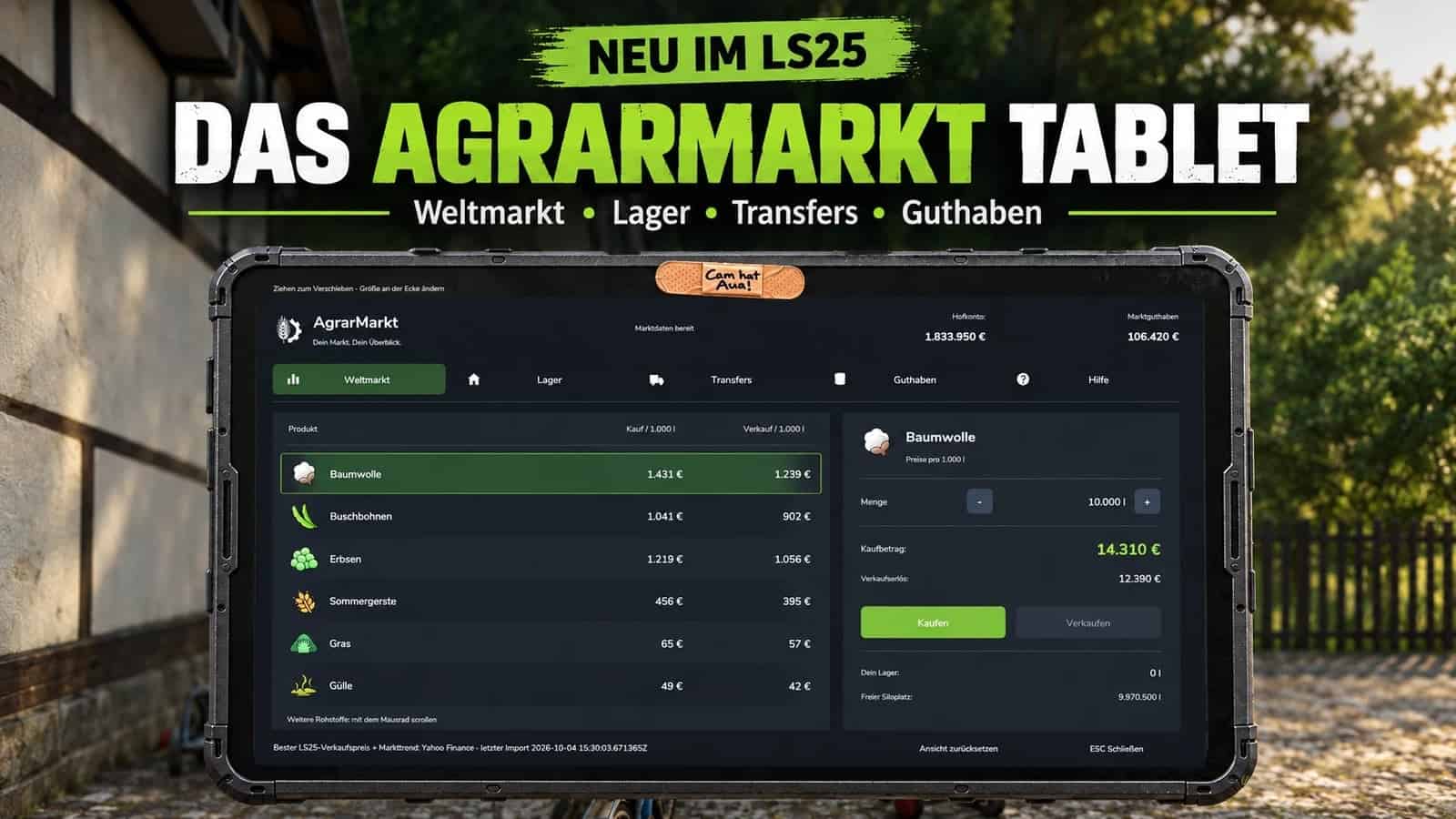
AgrarMarkt brings a shared online global market to Farming Simulator 25. This package includes the AgrarMarkt mod and the Windows Connector.
Features
- Public global market: Buy and sell goods through a shared market inventory, with no tester code required.
- Dynamic prices influenced by supply, demand, and trading activity.
- Trade directly in the game by reviewing the goods, quantity, and total amount in the AgrarMarkt menu before confirming a trade.
- AgrarMarkt silos for delivering goods for sale and collecting purchased goods.
- Price, stock level, and trading activity monitoring.
- Singleplayer and multiplayer support. In multiplayer, only one Connector is needed on the host or game server.
- The mod adds the market and AgrarMarkt silos to the game.
- The Connector connects to the online market and processes trade orders.
- The player market is available to all registered AgrarMarkt users with standard Discord access. Users can create listings and trade with other players without a tester code.
- Farm management, online storage, transfers, friends, trading partners, and messages are available with standard AgrarMarkt access.
- Registered testers can link their farm and use the storage, transfer, and player-trading features enabled for them.
- The used vehicle market and livestock market are currently included as previews only and are not yet open for trading.
Specifications
- Mod version: v0.25.23.34
- Connector version: v0.22.15
- The public global market requires no tester code.
- In multiplayer, only one Connector is needed on the host or game server.
New AgrarMarkt Tablet
- Standalone tablet featuring the global market, online storage, goods transfers, market balance, and help.
- Purchase price: €1,500, paid from the farm account.
- Tablet ownership is saved per farm in the savegame.
- Open it with Ctrl + S by default. The key binding can be changed freely.
- Can be used on foot and inside vehicles.
- Can be moved and freely resized. The preferred position and size are saved.
- Dark design, smaller fonts, clearer trading panels, and separate displays for the farm account and market balance.
- Farm codes can be entered with the hyphen included.
- Help is organized into step-by-step instructions.
- Fixed overlapping text at smaller tablet sizes.
- New slide-in, slide-out, and rotation animations without additional delays when showing the back.
- The back features worn stickers and a bandage over the camera labeled “Cam has a boo-boo!”
- The tablet and ESC menu use the same trading functions and market data.
Used Vehicle Market
- Integrated with the Website and API for testers only.
- 55 verified base-game FS25 tractors approved, covering small, medium, and large tractors.
- Only owned vehicles are eligible. Leased vehicles, mod vehicles, DLC vehicles, and other vehicle categories remain excluded.
- When placed into online storage, the tractor is removed from the game and transferred to the online market.
- Buyers can collect purchased tractors from the vehicle dealer, and sellers receive the sale proceeds.
- Equipment, colors, configurations, operating hours, age, damage, wear, and vehicle value are taken into account.
- Improved retrieval and resale of previously traded vehicles.
- Added checks to prevent duplicate listings and repeated vehicle transfers.
- Reworked selling, collection, and retrieval for multiplayer clients and dedicated servers.
- The used vehicle market remains an additional tester-only feature.
- The used vehicle market requires the tester role and a valid tester code.
Connector
- Market overview with a searchable product list, product images, purchase and sale prices, and stock levels.
- Displays available price histories, purchases, sales, and market movements from the last two hours.
- The market overview uses market data already received and does not require an additional market query.
- Improved FTP queue processing with alternative directory-listing methods for game servers.
- Fixed trade confirmations and financial receipts. Rejected transactions are no longer reported as successful purchases or sales.
- Farm queries and vehicle transfers take the savegame and farm assignment into account.
- Standard features and tester features are separated according to access permissions.
- Version checks for the mod and Connector. Update notifications and mandatory updates can be controlled through the admin panel once enabled.
- The Connector retains its identity after updates and changes to the program folder.
- Standardized version displays, build filenames, and instructions to v0.22.15.
- The livestock market and phone are in development.
Changelog
Mod v0.25.23 -> v0.25.23.34 (Open Beta)
Connector v0.22.13 -> v0.22.15 (Open Beta)
- Added a separate euro amount selector for deposits and withdrawals. Goods quantities and market funds can be adjusted independently.
- Improved multiplayer silo functionality and protection of farm inventories when demolishing and rebuilding silos.
- Moved AgrarMarkt higher up in the ESC menu to make the page easier to access in self-hosted multiplayer.
- Added a dedicated Help tab with instructions for the Connector, silo selection, farm linking, and the global market.
- Revised menu text and numerous status and error messages in German and English.
- Commodity names now use the translations provided by the game.
- Updated mod and menu icons.
- Fixed the notification informing players that purchases or sales are available again after a trading restriction expires.
Installation
Extract the Package First!
- Download the complete AgrarMarkt package and extract the downloaded ZIP file. Do not place the entire download package in your mods folder.
- Inside the extracted package, you will find the mod ZIP file
FS25_AgrarMarket.zip. Do not extract this file again; copy it directly into your FS25 mods folder. - Run the Connector EXE from the extracted package and configure your server or farm name and the connection to the game.
- Activate the mod when loading your savegame and start the Connector before using the online market.
No tester code is required for the public global market. If you are a registered tester, you can enter your code in the Connector to access the additional testing features.
Included versions: Mod v0.25.23 · Connector v0.22.13