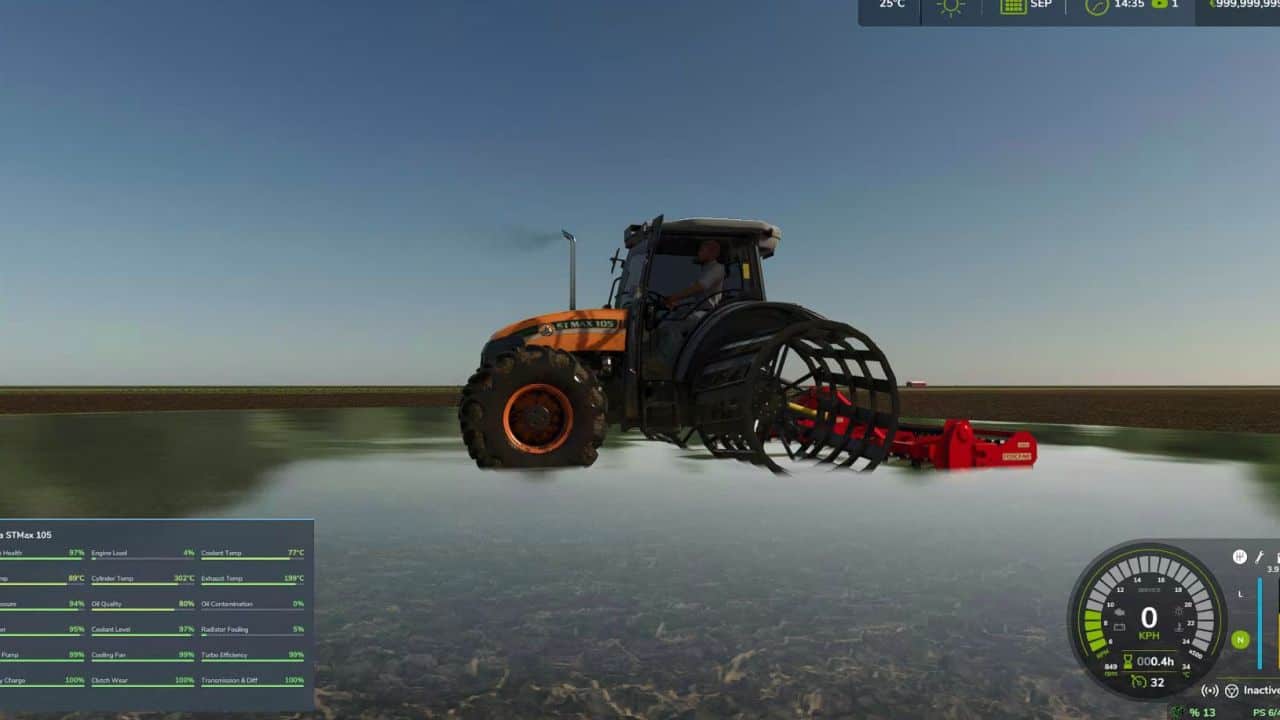
Real Mechanical Wear adds a detailed mechanical wear and maintenance system to Farming Simulator 25. Instead of vehicles simply losing a generic amount of condition, this mod simulates the wear of individual mechanical systems based on engine load, operating conditions, contamination, temperature and usage. The harder you work your machines, the more mechanical stress they experience.
The engine is divided into several internal components:
– Cylinder wear
– Piston wear
– Bearing wear
– Crankshaft wear
– Valve wear
– Compression loss
– Blow-by
– Internal friction
– Carbon buildup
– Power loss
– Increased fuel consumption
– Starting reliability
– Idle stability
Engine wear is affected by the actual operating stress of the vehicle. Constantly running an engine under heavy load will cause significantly more wear than normal light-duty operation.
The oil system is simulated independently and includes:
– Oil level
– Oil quality
– Oil contamination
– Oil filter condition
Poor oil condition increases internal friction and accelerates mechanical wear.
The cooling system includes:
– Coolant level
– Coolant quality
– Radiator dirt
– Cooling fan condition
– Thermostat condition
– Water pump condition
Poor cooling can increase thermal stress and accelerate mechanical damage.
Turbocharged vehicles can experience:
– Turbo bearing wear
– Turbo shaft wear
Turbo wear is integrated into the overall mechanical condition of the vehicle.
The drivetrain includes independent wear for:
– Clutch
– Transmission gears
– Differential
– Transmission oil
Heavy work and prolonged high-load operation can accelerate drivetrain wear.
The fuel system includes:
– Injector condition
– Fuel pump condition
– Fuel filter condition
As components deteriorate, vehicle performance and reliability can be affected.
The electrical starting system includes:
– Battery capacity
– Battery charge
– Starter condition
– Alternator condition
A severely damaged battery or starter can prevent the engine from starting.
A jump-start function is also available when necessary.
Exhaust Smoke & Performance
Mechanical problems can have visible consequences.
Depending on the condition of the engine, the vehicle may experience:
– Increased exhaust smoke
– Reduced engine power
– Increased fuel consumption
– Poor idle stability
– Reduced starting reliability
Realistic Failure System
Severe mechanical deterioration can eventually lead to failures.
Ignoring maintenance is therefore no longer just a cosmetic issue — it can become an actual operational problem.
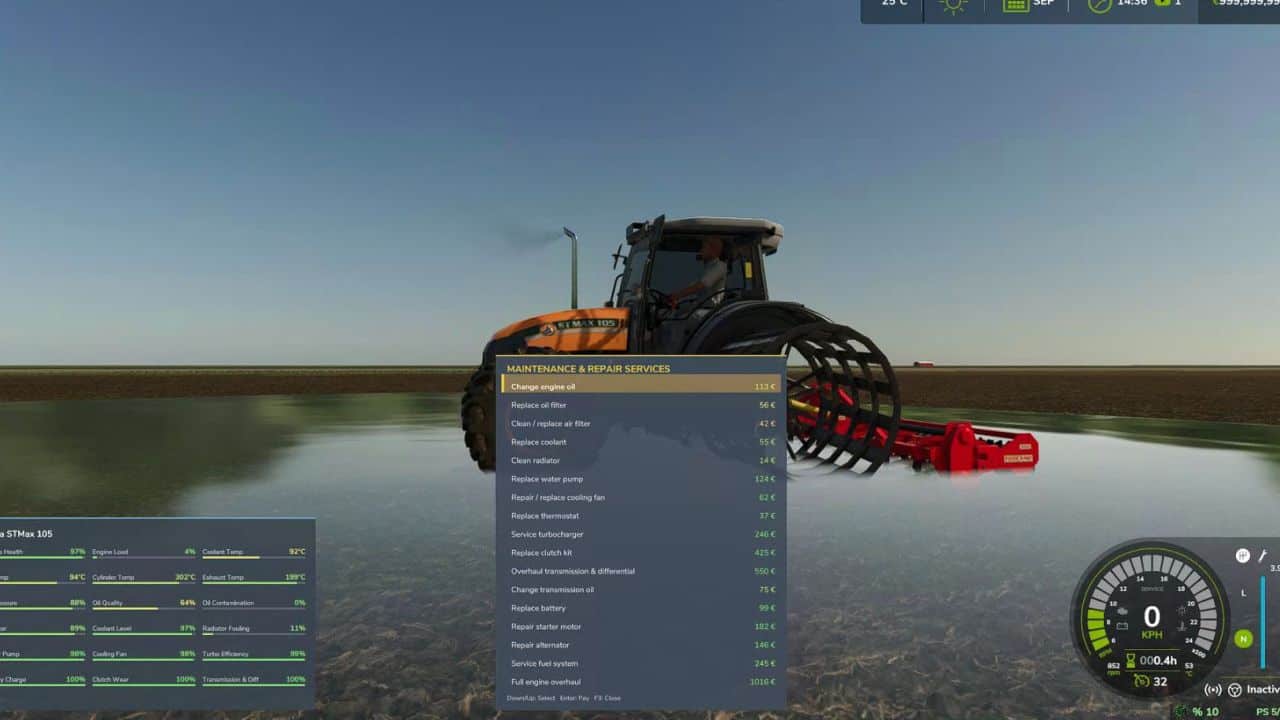
The mod provides a comprehensive maintenance system with separate service options:
– Engine oil change
– Oil filter replacement
– Air filter service
– Coolant service
– Radiator cleaning
– Water pump replacement
– Cooling fan replacement
– Thermostat replacement
– Turbocharger service
– Clutch replacement
– Transmission repair
– Transmission oil change
– Battery replacement
– Starter replacement
– Alternator replacement
– Fuel system service
– Complete engine overhaul
Maintenance costs are calculated according to the vehicle price and the severity of the wear.
Dynamic Wear Simulation
– Wear is not simply based on operating hours.
– The system uses a mechanical stress model where sustained high-load operation causes disproportionately higher wear.
For example:
– Light work → Low mechanical stress → Slow wear
– Normal work → Moderate stress → Normal wear
– Heavy work → High stress → Rapid wear
Additional factors such as oil contamination and overheating can further increase the wear rate. This means that two identical tractors with the same operating hours can have completely different mechanical conditions depending on how they were used.
Carbon Buildup
Carbon buildup is simulated separately. Extended low-load and idle operation can increase carbon accumulation, while sustained higher-load operation can gradually reduce buildup. This creates another reason to operate and maintain machines properly.
Persistent Vehicle Condition
– Mechanical condition is saved with the vehicle.
Your machines retain their:
– Engine wear
– Oil condition
– Cooling condition
– Turbo wear
– Transmission wear
– Battery condition
– Fuel-system condition
– Active failures
– Other mechanical data
The machine therefore develops its own mechanical history throughout your savegame.
In-Game HUD
– The mod provides a dedicated mechanical HUD displaying important information about the vehicle’s condition.
– The HUD can be switched between different display modes or hidden completely.
Difficulty
– Wear difficulty can be adjusted in-game.
– Increase the difficulty for a more demanding mechanical simulation, or reduce it if you prefer a more relaxed gameplay experience.
Compatibility
– Real Mechanical Wear is designed to automatically attach to motorized vehicles.
– This means it can work with tractors, harvesters, trucks and other motorized vehicles without requiring modifications to the original vehicle files.
Important
This mod is designed for players who want a deeper and more realistic vehicle maintenance experience. If you prefer a simple arcade-style gameplay experience with minimal maintenance, this mod may make vehicle operation considerably more demanding. Recommended for players who enjoy realistic farming, machinery management and long-term vehicle ownership.
The default keyboard controls are:
| Key | Function |
| ————– | ———————————– |
| F2 | Toggle Mechanical HUD |
| F3 | Open Maintenance Panel |
| F5 | Increase Wear Difficulty |
| F4 | Decrease Wear Difficulty |
| F6 | Jump Start |
| END | Select next maintenance item |
| DELETE | Confirm selected maintenance action |
F2 – Mechanical HUD
– Press F2 to cycle through the available HUD display modes:
– Compact → Full → Hidden
– This allows you to keep the mechanical information visible without taking too much screen space.
– F3 – Maintenance
– Press F3 to open the maintenance panel.
Use:
– END – Select the next maintenance operation
– DELETE – Perform the selected maintenance operation
– Maintenance costs depend on the vehicle price and the severity of the component wear.
F4 / F5 – Difficulty
– F5 increases the mechanical wear difficulty.
– F4 decreases the mechanical wear difficulty.
– Higher difficulty results in faster mechanical deterioration.
F6 – Jump Start
– Press F6 when the vehicle has a battery or starter problem and requires a jump start.
– A jump start does not repair the underlying mechanical problem. Proper maintenance or component replacement may still be required.
Changing the Controls
– The default controls can be changed through the Farming Simulator 25 control settings.
Open:
– Options → Controls → Keyboard
– Search for the **Real Mechanical Wear** actions and assign your preferred keys.
Recommended default layout:
– F2 – HUD
– F3 – Maintenance
– F4/ F5*– Difficulty
– F6 – Jump Start
The maintenance navigation uses the **END** key and **DELETE** by default.